Monday, February 18, 2013

Select records from a cursor into PL/SQL table

declare
  -- Declare the PL/SQL table
  type deptarr is table of dept%rowtype
       index by binary_integer;
  d_arr deptarr;

  -- Declare cursor
  type d_cur is ref cursor return dept%rowtype;
  c1 d_cur;

  i number := 1;
begin
  -- Populate the PL/SQL table from the cursor
  open c1 for select * from dept;
  loop
    exit when c1%NOTFOUND;
    fetch c1 into d_arr(i);
    i := i+1;
  end loop;
  close c1;

  -- Display the entire PL/SQL table on screen
  for i in 1..d_arr.last loop
    dbms_output.put_line('DEPTNO : '||d_arr(i).deptno );
    dbms_output.put_line('DNAME  : '||d_arr(i).dname  );
    dbms_output.put_line('LOC    : '||d_arr(i).loc    );
    dbms_output.put_line('---------------------------');
  end loop;
end;

Simple program to demonstrate BULK COLLECT and BULK BIND operations

DECLARE
  CURSOR emp_cur IS SELECT * FROM EMP;

  TYPE emp_tab_t IS TABLE OF emp%ROWTYPE INDEX BY BINARY_INTEGER;
  emp_tab emp_tab_t;            -- In-memory table

  rows NATURAL        := 10000;   -- Number of rows to process at a time
  i    BINARY_INTEGER := 0;
BEGIN
  OPEN emp_cur;
  LOOP
    -- Bulk collect data into memory table - X rows at a time
    FETCH emp_cur BULK COLLECT INTO emp_tab LIMIT rows;
    EXIT WHEN emp_tab.COUNT = 0;

    DBMS_OUTPUT.PUT_LINE( TO_CHAR(emp_tab.COUNT)|| ' rows bulk fetched.');

    FOR i IN emp_tab.FIRST .. emp_tab.LAST loop
      -- Manipumate data in the memory table...
      dbms_output.put_line('i = '||i||', EmpName='||emp_tab(i).ename);
    END LOOP;

    -- Bulk bind of data in memory table...
    FORALL i in emp_tab.FIRST..emp_tab.LAST
      INSERT /*+APPEND*/ INTO emp2 VALUES emp_tab(i);

  END LOOP;
  CLOSE emp_cur;
END;

Tuesday, January 29, 2013

Collections in Oracle PL/SQL

Oracle uses collections in PL/SQL the same way other languages use arrays. Oracle provides three basic collections, each with an assortment of methods.

  • Index-By Tables (Associative Arrays)
  • Nested Table
  • Varrays
  • Collection Methods
  • Multiset Operations
  • Multidimensional Collections
Related articles.
  • Associative Arrays in Oracle 9i
  • Bulk Binds (BULK COLLECT & FORALL) and Record Processing in Oracle

Index-By Tables (Associative Arrays)

The first type of collection is known as index-by tables. These behave in the same way as arrays except that have no upper bounds, allowing them to constantly extend. As the name implies, the collection is indexed using BINARY_INTEGER values, which do not need to be consecutive. The collection is extended by assigning values to an element using an index value that does not currently exist.
SET SERVEROUTPUT ON SIZE 1000000
DECLARE
  TYPE table_type IS TABLE OF NUMBER(10)
    INDEX BY BINARY_INTEGER;
  
  v_tab  table_type;
  v_idx  NUMBER;
BEGIN
  -- Initialise the collection.
  << load_loop >>
  FOR i IN 1 .. 5 LOOP
    v_tab(i) := i;
  END LOOP load_loop;
  
  -- Delete the third item of the collection.
  v_tab.DELETE(3);
  
  -- Traverse sparse collection
  v_idx := v_tab.FIRST;
  << display_loop >>
  WHILE v_idx IS NOT NULL LOOP
    DBMS_OUTPUT.PUT_LINE('The number ' || v_tab(v_idx));
    v_idx := v_tab.NEXT(v_idx);
  END LOOP display_loop;
END;
/

The number 1
The number 2
The number 4
The number 5

PL/SQL procedure successfully completed.

SQL>
In Oracle 9i Release 2 these have been renamed to Associative Arrays and can be indexed by BINARY INTEGER or VARCHAR2.

Nested Table Collections

Nested table collections are an extension of the index-by tables. The main difference between the two is that nested tables can be stored in a database column but index-by tables cannot. In addition some DML operations are possible on nested tables when they are stored in the database. During creation the collection must be dense, having consecutive subscripts for the elements. Once created elements can be deleted using the DELETE method to make the collection sparse. The NEXT method overcomes the problems of traversing sparse collections.
SET SERVEROUTPUT ON SIZE 1000000
DECLARE
  TYPE table_type IS TABLE OF NUMBER(10);
  v_tab  table_type;
  v_idx  NUMBER;
BEGIN

  -- Initialise the collection with two values.
  v_tab := table_type(1, 2);

  -- Extend the collection with extra values.
  << load_loop >>
  FOR i IN 3 .. 5 LOOP
    v_tab.extend;
    v_tab(v_tab.last) := i;
  END LOOP load_loop;
  
  -- Delete the third item of the collection.
  v_tab.DELETE(3);
  
  -- Traverse sparse collection
  v_idx := v_tab.FIRST;
  << display_loop >>
  WHILE v_idx IS NOT NULL LOOP
    DBMS_OUTPUT.PUT_LINE('The number ' || v_tab(v_idx));
    v_idx := v_tab.NEXT(v_idx);
  END LOOP display_loop;
END;
/

The number 1
The number 2
The number 4
The number 5

PL/SQL procedure successfully completed.

SQL>

Varray Collections

A VARRAY is similar to a nested table except you must specifiy an upper bound in the declaration. Like nested tables they can be stored in the database, but unlike nested tables individual elements cannot be deleted so they remain dense.
SET SERVEROUTPUT ON SIZE 1000000
DECLARE
  TYPE table_type IS VARRAY(5) OF NUMBER(10);
  v_tab  table_type;
  v_idx  NUMBER;
BEGIN
  -- Initialise the collection with two values.
  v_tab := table_type(1, 2);

  -- Extend the collection with extra values.
  << load_loop >>
  FOR i IN 3 .. 5 LOOP
    v_tab.extend;
    v_tab(v_tab.last) := i;
  END LOOP load_loop;
  
  -- Can't delete from a VARRAY.
  -- v_tab.DELETE(3);

  -- Traverse collection
  v_idx := v_tab.FIRST;
  << display_loop >>
  WHILE v_idx IS NOT NULL LOOP
    DBMS_OUTPUT.PUT_LINE('The number ' || v_tab(v_idx));
    v_idx := v_tab.NEXT(v_idx);
  END LOOP display_loop;
END;
/

The number 1
The number 2
The number 3
The number 4
The number 5

PL/SQL procedure successfully completed.

SQL>
Extending the load_loop to 3..6 attempts to extend the VARRAY beyond it's limit of 5 elements resulting in the following error.
DECLARE
*
ERROR at line 1:
ORA-06532: Subscript outside of limit
ORA-06512: at line 12

Collection Methods

A variety of methods exist for collections, but not all are relevant for every collection type.
  • EXISTS(n) - Returns TRUE if the specified element exists.
  • COUNT - Returns the number of elements in the collection.
  • LIMIT - Returns the maximum number of elements for a VARRAY, or NULL for nested tables.
  • FIRST - Returns the index of the first element in the collection.
  • LAST - Returns the index of the last element in the collection.
  • PRIOR(n) - Returns the index of the element prior to the specified element.
  • NEXT(n) - Returns the index of the next element after the specified element.
  • EXTEND - Appends a single null element to the collection.
  • EXTEND(n) - Appends n null elements to the collection.
  • EXTEND(n1,n2) - Appends n1 copies of the n2th element to the collection.
  • TRIM - Removes a single element from the end of the collection.
  • TRIM(n) - Removes n elements from the end of the collection.
  • DELETE - Removess all elements from the collection.
  • DELETE(n) - Removes element n from the collection.
  • DELETE(n1,n2) - Removes all elements from n1 to n2 from the collection.

Multiset Operations

Oracle provides MULTISET operations against collectsion, including the following.
MULTISET UNION joins the two collections together, doing the equivalent of a UNION ALL between the two sets.
SET SERVEROUTPUT ON
DECLARE
  TYPE t_tab IS TABLE OF NUMBER;
  l_tab1 t_tab := t_tab(1,2,3,4,5,6);
  l_tab2 t_tab := t_tab(5,6,7,8,9,10);
BEGIN
  l_tab1 := l_tab1 MULTISET UNION l_tab2;
  
  FOR i IN l_tab1.first .. l_tab1.last LOOP
    DBMS_OUTPUT.put_line(l_tab1(i));
  END LOOP;
END;
/
1
2
3
4
5
6
5
6
7
8
9
10

PL/SQL procedure successfully completed.

SQL>
The DISTINCT keyword can be added to any of the multiset operations to removes the duplicates. Adding it to the MULTISET UNION makes it the equivalent of a UNION between the two sets.
SET SERVEROUTPUT ON
DECLARE
  TYPE t_tab IS TABLE OF NUMBER;
  l_tab1 t_tab := t_tab(1,2,3,4,5,6);
  l_tab2 t_tab := t_tab(5,6,7,8,9,10);
BEGIN
  l_tab1 := l_tab1 MULTISET UNION DISTINCT l_tab2;
  
  FOR i IN l_tab1.first .. l_tab1.last LOOP
    DBMS_OUTPUT.put_line(l_tab1(i));
  END LOOP;
END;
/
1
2
3
4
5
6
7
8
9
10

PL/SQL procedure successfully completed.

SQL>
MULTISET EXCEPT returns the elements of the first set that are not present in the second set.
SET SERVEROUTPUT ON
DECLARE
  TYPE t_tab IS TABLE OF NUMBER;
  l_tab1 t_tab := t_tab(1,2,3,4,5,6,7,8,9,10);
  l_tab2 t_tab := t_tab(6,7,8,9,10);
BEGIN
  l_tab1 := l_tab1 MULTISET EXCEPT l_tab2;
  
  FOR i IN l_tab1.first .. l_tab1.last LOOP
    DBMS_OUTPUT.put_line(l_tab1(i));
  END LOOP;
END;
/
1
2
3
4
5

PL/SQL procedure successfully completed.

SQL>
MULTISET INTERSECT returns the elements that are present in both sets.
SET SERVEROUTPUT ON
DECLARE
  TYPE t_tab IS TABLE OF NUMBER;
  l_tab1 t_tab := t_tab(1,2,3,4,5,6,7,8,9,10);
  l_tab2 t_tab := t_tab(6,7,8,9,10);
BEGIN
  l_tab1 := l_tab1 MULTISET INTERSECT l_tab2;
  
  FOR i IN l_tab1.first .. l_tab1.last LOOP
    DBMS_OUTPUT.put_line(l_tab1(i));
  END LOOP;
END;
/
6
7
8
9
10

PL/SQL procedure successfully completed.

SQL>

Multidimensional Collections

In addition to regular data types, collections can be based on record types, allowing the creation of two-dimensional collections.
SET SERVEROUTPUT ON

-- Collection of records.
DECLARE
  TYPE t_row IS RECORD (
    id  NUMBER,
    description VARCHAR2(50)
  );

  TYPE t_tab IS TABLE OF t_row;
  l_tab t_tab := t_tab();
BEGIN
  FOR i IN 1 .. 10 LOOP
    l_tab.extend();
    l_tab(l_tab.last).id := i;
    l_tab(l_tab.last).description := 'Description for ' || i;
  END LOOP;
END;
/

-- Collection of records based on ROWTYPE.
CREATE TABLE t1 (
  id  NUMBER,
  description VARCHAR2(50)
);

SET SERVEROUTPUT ON
DECLARE
  TYPE t_tab IS TABLE OF t1%ROWTYPE;
  l_tab t_tab := t_tab();
BEGIN
  FOR i IN 1 .. 10 LOOP
    l_tab.extend();
    l_tab(l_tab.last).id := i;
    l_tab(l_tab.last).description := 'Description for ' || i;
  END LOOP;
END;
/
For multidimentional arrays you can build collections of collections.
DECLARE
  TYPE t_tab1 IS TABLE OF NUMBER;
  TYPE t_tab2 IS TABLE OF t_tab1;
  l_tab1 t_tab1 := t_tab1(1,2,3,4,5);
  l_tab2 t_tab2 := t_tab2();
BEGIN
  FOR i IN 1 .. 10 LOOP
    l_tab2.extend();
    l_tab2(l_tab2.last) := l_tab1;
  END LOOP;
END;
/

Autonomous Transactions

Autonomous transactions allow you to leave the context of the calling transaction, perform an independant transaction, and return to the calling transaction without affecting it's state. The autonomous transaction has no link to the calling transaction, so only commited data can be shared by both transactions.
The following types of PL/SQL blocks can be defined as autonomous transactions:
  • Stored procedures and functions.
  • Local procedures and functions defined in a PL/SQL declaration block.
  • Packaged procedures and functions.
  • Type methods.
  • Top-level anonymous blocks.
The easiest way to understand autonomous transactions is to see them in action. To do this, we create a test table and populate it with two rows. Notice that the data is not commited.
CREATE TABLE at_test (
  id           NUMBER       NOT NULL,
  description  VARCHAR2(50) NOT NULL
);

INSERT INTO at_test (id, description) VALUES (1, 'Description for 1');
INSERT INTO at_test (id, description) VALUES (2, 'Description for 2');

SELECT * FROM at_test;

        ID DESCRIPTION
---------- --------------------------------------------------
         1 Description for 1
         2 Description for 2

2 rows selected.

SQL>
Next, we insert another 8 rows using an anonymous block declared as an autonomous transaction, which contains a commit statement.
DECLARE
  PRAGMA AUTONOMOUS_TRANSACTION;
BEGIN
  FOR i IN 3 .. 10 LOOP
    INSERT INTO at_test (id, description)
    VALUES (i, 'Description for ' || i);
  END LOOP;
  COMMIT;
END;
/

PL/SQL procedure successfully completed.

SELECT * FROM at_test;

        ID DESCRIPTION
---------- --------------------------------------------------
         1 Description for 1
         2 Description for 2
         3 Description for 3
         4 Description for 4
         5 Description for 5
         6 Description for 6
         7 Description for 7
         8 Description for 8
         9 Description for 9
        10 Description for 10

10 rows selected.

SQL>
As expected, we now have 10 rows in the table. If we now issue a rollback statement we get the following result.
ROLLBACK;
SELECT * FROM at_test;

        ID DESCRIPTION
---------- --------------------------------------------------
         3 Description for 3
         4 Description for 4
         5 Description for 5
         6 Description for 6
         7 Description for 7
         8 Description for 8
         9 Description for 9
        10 Description for 10

8 rows selected.

SQL>
The 2 rows inserted by our current session (transaction) have been rolled back, while the rows inserted by the autonomous transactions remain. The presence of the PRAGMA AUTONOMOUS_TRANSACTION compiler directive made the anonymous block run in its own transaction, so the internal commit statement did not affect the calling session. As a result rollback was still able to affect the DML issued by the current statement.
Autonomous transactions are commonly used by error logging routines, where the error messages must be preserved, regardless of the the commit/rollback status of the transaction. For example, the following table holds basic error messages.
CREATE TABLE error_logs (
  id             NUMBER(10)     NOT NULL,
  log_timestamp  TIMESTAMP      NOT NULL,
  error_message  VARCHAR2(4000),
  CONSTRAINT error_logs_pk PRIMARY KEY (id)
);

CREATE SEQUENCE error_logs_seq;
We define a procedure to log error messages as an autonomous transaction.
CREATE OR REPLACE PROCEDURE log_errors (p_error_message  IN  VARCHAR2) AS
  PRAGMA AUTONOMOUS_TRANSACTION;
BEGIN
  INSERT INTO error_logs (id, log_timestamp, error_message)
  VALUES (error_logs_seq.NEXTVAL, SYSTIMESTAMP, p_error_message);
  COMMIT;
END;
/
The following code forces an error, which is trapped and logged.
BEGIN
  INSERT INTO at_test (id, description)
  VALUES (998, 'Description for 998');

  -- Force invalid insert.
  INSERT INTO at_test (id, description)
  VALUES (999, NULL);
EXCEPTION
  WHEN OTHERS THEN
    log_errors (p_error_message => SQLERRM);
    ROLLBACK;
END;
/

PL/SQL procedure successfully completed.

SELECT * FROM at_test WHERE id >= 998;

no rows selected

SELECT * FROM error_logs;

        ID LOG_TIMESTAMP
---------- ---------------------------------------------------------------------------
ERROR_MESSAGE
----------------------------------------------------------------------------------------------------
         1 28-FEB-2006 11:10:10.107625
ORA-01400: cannot insert NULL into ("TIM_HALL"."AT_TEST"."DESCRIPTION")


1 row selected.

SQL>
From this we can see that the LOG_ERRORS transaction was separate to the anonymous block. If it weren't, we would expect the first insert in the anonymous block to be preserved by the commit statement in the LOG_ERRORS procedure.
Be careful how you use autonomous transactions. If they are used indiscriminately they can lead to deadlocks, and cause confusion when analyzing session trace. To hammer this point home,

"... in 999 times out of 1000, if you find yourself "forced" to use an autonomous transaction - it likely means you have a serious data integrity issue you haven't thought about.
Where do people try to use them?
  • in that trigger that calls a procedure that commits (not an error logging routine). Ouch, that has to hurt when you rollback.
  • in that trigger that is getting the mutating table constraint. Ouch, that hurts *even more*
Error logging - OK.
Almost everything else - not OK."
For more information see:

Monday, December 17, 2012

Assign Item to an Organization in Oracle APPS Inventory by using API

EGO_ITEM_PUB package provides functionality for maintaining items, item revisions, etc. We can use ASSIGN_ITEM_TO_ORG procedure to assign one item to an organization.

The procedure definition is:


PROCEDURE Assign_Item_To_Org(
    p_api_version             IN      NUMBER
   ,p_init_msg_list           IN      VARCHAR2        DEFAULT  G_FALSE
   ,p_commit                  IN      VARCHAR2        DEFAULT  G_FALSE
   ,p_Inventory_Item_Id       IN      NUMBER          DEFAULT  G_MISS_NUM
   ,p_Item_Number             IN      VARCHAR2        DEFAULT  G_MISS_CHAR
   ,p_Organization_Id         IN      NUMBER          DEFAULT  G_MISS_NUM
   ,p_Organization_Code       IN      VARCHAR2        DEFAULT  G_MISS_CHAR
   ,p_Primary_Uom_Code        IN      VARCHAR2        DEFAULT  G_MISS_CHAR
   ,x_return_status           OUT NOCOPY  VARCHAR2
   ,x_msg_count               OUT NOCOPY  NUMBER);

The parameters are:
  • P_API_VERSION – A decimal number indicating major and minor revisions to the API. Pass 1.0 unless otherwise indicated in the API parameter list.
  • P_INIT_MSG_LIST – A one-character flag indicating whether to initialize the FND_MSG_PUB package’s message stack at the beginning of API processing (and thus remove any messages that may exist on the stack from prior processing in the same session). Valid values are FND_API.G_TRUE and FND_API.G_FALSE.
  • P_COMMIT – A one-character flag indicating whether to commit work at the end of API processing. Valid values are FND_API.G_TRUE and FND_API.G_FALSE.
  • P_INVENTORY_ITEM_ID – Inventory Item Id of the Item
  • P_ITEM_NUMBER – Segment1 of the Item
  • P_ORGANIZATION_ID – Organization Id of the Organization to whom Item must be assigned
  • P_ORGANIZATION_CODE – 3 character Organization Code of the Organization to whom Item must be assigned
  • P_PRIMARY_UOM_CODE – Primary Unit of Measure of the item.
  • X_RETURN_STATUS – A one-character code indicating whether any errors occurred during processing (in which case error messages will be present on the FND_MSG_PUB package’s message stack). Valid values are FND_API.G_RET_STS_SUCCESS, FND_API.G_RET_STS_ERROR, and FND_API.G_RET_STS_UNEXP_ERROR.
  • X_MSG_COUNT – An integer indicating the number of messages on the FND_MSG_PUB package’s message stack at the end of API processing.
Sample Code: (Tested in R12.1.3)
DECLARE
        g_user_id             fnd_user.user_id%TYPE :=NULL;
        l_appl_id             fnd_application.application_id%TYPE;
        l_resp_id             fnd_responsibility_tl.responsibility_id%TYPE;
        l_api_version    NUMBER := 1.0;
        l_init_msg_list       VARCHAR2(2) := fnd_api.g_false;
        l_commit        VARCHAR2(2) := FND_API.G_FALSE;
        x_message_list        error_handler.error_tbl_type;
        x_return_status    VARCHAR2(2);
        x_msg_count        NUMBER := 0;
BEGIN
        SELECT fa.application_id
          INTO l_appl_id
          FROM fnd_application fa
         WHERE fa.application_short_name = 'INV';

        SELECT fr.responsibility_id
          INTO l_resp_id
          FROM fnd_application fa, fnd_responsibility_tl fr
         WHERE fa.application_short_name = 'INV'
           AND fa.application_id = fr.application_id
           AND UPPER (fr.responsibility_name) = 'INVENTORY';

        fnd_global.apps_initialize (g_user_id, l_resp_id, l_appl_id);

        EGO_ITEM_PUB.ASSIGN_ITEM_TO_ORG(
                   P_API_VERSION          => l_api_version
                ,  P_INIT_MSG_LIST        => l_init_msg_list
                ,  P_COMMIT               => l_commit
                ,  P_INVENTORY_ITEM_ID    => 1003
                ,  p_item_number          => 000000000001035
                ,  p_organization_id      => 11047
                ,  P_ORGANIZATION_CODE    => 'DXN'
                ,  P_PRIMARY_UOM_CODE     => 'EA'
                ,  X_RETURN_STATUS        => x_return_status
                ,  X_MSG_COUNT            => x_msg_count
            );
        DBMS_OUTPUT.PUT_LINE('Status: '||x_return_status);
        IF (x_return_status <> FND_API.G_RET_STS_SUCCESS) THEN
          DBMS_OUTPUT.PUT_LINE('Error Messages :');
          Error_Handler.GET_MESSAGE_LIST(x_message_list=>x_message_list);
            FOR j IN 1..x_message_list.COUNT LOOP
              DBMS_OUTPUT.PUT_LINE(x_message_list(j).message_text);
            END LOOP;
        END IF;
EXCEPTION
        WHEN OTHERS THEN
          dbms_output.put_line('Exception Occured :');
          DBMS_OUTPUT.PUT_LINE(SQLCODE ||':'||SQLERRM);
END;

Item Category Creation APIs


There are few APIs in INV_ITEM_CATEGORY_PUB package related to item category. This article will follow a category flexfield structure. Please refer the below post for more detail.
INV_ITEM_CATEGORY_PUB.Create_Category:

DECLARE
l_category_rec    INV_ITEM_CATEGORY_PUB.CATEGORY_REC_TYPE;
l_return_status   VARCHAR2(80);
l_error_code      NUMBER;
l_msg_count       NUMBER;
l_msg_data        VARCHAR2(80);
l_out_category_id NUMBER;
BEGIN
  l_category_rec.segment1 := 'RED';

  SELECT f.ID_FLEX_NUM
    INTO l_category_rec.structure_id
    FROM FND_ID_FLEX_STRUCTURES f
   WHERE f.ID_FLEX_STRUCTURE_CODE = 'INV_COLORS';

  l_category_rec.description := 'Red';

  INV_ITEM_CATEGORY_PUB.Create_Category
          (
          p_api_version   => 1.0,
          p_init_msg_list => FND_API.G_FALSE,
          p_commit        => FND_API.G_TRUE,
          x_return_status => l_return_status,
          x_errorcode     => l_error_code,
          x_msg_count     => l_msg_count,
          x_msg_data      => l_msg_data,
          p_category_rec  => l_category_rec,
          x_category_id   => l_out_category_id
          );
  IF l_return_status = fnd_api.g_ret_sts_success THEN
    COMMIT;
    DBMS_OUTPUT.put_line ('Creation of Item Category is Successful : '||l_out_category_id);
  ELSE
    DBMS_OUTPUT.put_line ('Creation of Item Category Failed with the error :'||l_error_code);
    ROLLBACK;
  END IF;
END ;
 
INV_ITEM_CATEGORY_PUB. Delete_Category:
 
DECLARE
l_return_status VARCHAR2(80);
l_error_code    NUMBER;
l_msg_count     NUMBER;
l_msg_data      VARCHAR2(80);
l_category_id   NUMBER;
BEGIN
  SELECT mcb.CATEGORY_ID
    INTO l_category_id
    FROM mtl_categories_b mcb
   WHERE mcb.SEGMENT1='RED'
     AND mcb.STRUCTURE_ID =
        (SELECT mcs_b.STRUCTURE_ID
           FROM mtl_category_sets_b mcs_b
          WHERE mcs_b.CATEGORY_SET_ID =
               (SELECT mcs_tl.CATEGORY_SET_ID
                  FROM mtl_category_sets_tl mcs_tl
                 WHERE CATEGORY_SET_NAME ='INV_COLORS_SET'
                 )
        );

    INV_ITEM_CATEGORY_PUB.Delete_Category
          (
          p_api_version     => 1.0,
          p_init_msg_list   => FND_API.G_FALSE,
          p_commit          => FND_API.G_TRUE,
          x_return_status   => l_return_status,
          x_errorcode       => l_error_code,
          x_msg_count       => l_msg_count,
          x_msg_data        => l_msg_data,
          p_category_id     => l_category_id);

  IF l_return_status = fnd_api.g_ret_sts_success THEN
    COMMIT;
    DBMS_OUTPUT.put_line ('Deletion of Item Category is Successful : '||l_category_id);
  ELSE
    DBMS_OUTPUT.put_line ('Deletion of Item Category Failed with the error :'||l_error_code);
    ROLLBACK;
  END IF;
END ;
 
INV_ITEM_CATEGORY_PUB.Update_Category_Description
Updates the category description.
DECLARE
         l_return_status VARCHAR2(80);
         l_error_code    NUMBER;
         l_msg_count     NUMBER;
         l_msg_data      VARCHAR2(80);
         l_category_id   NUMBER;
         l_description   VARCHAR2(80);
BEGIN
      select mcb.CATEGORY_ID into l_category_id
        from mtl_categories_b mcb
       where mcb.SEGMENT1='BLACK'
         and mcb.STRUCTURE_ID = (select mcs_b.STRUCTURE_ID
             from mtl_category_sets_b mcs_b
             where mcs_b.CATEGORY_SET_ID = (select mcs_tl.CATEGORY_SET_ID
                 from mtl_category_sets_tl mcs_tl
                 where CATEGORY_SET_NAME ='INV_COLORS_SET'));

      l_description := 'new black color';

     INV_ITEM_CATEGORY_PUB.Update_Category_Description (
       p_api_version     => 1.0,
       p_init_msg_list   => FND_API.G_FALSE,
       p_commit          => FND_API.G_TRUE,
       x_return_status   => l_return_status,
       x_errorcode       => l_error_code,
       x_msg_count       => l_msg_count,
       x_msg_data        => l_msg_data,
       p_category_id     => l_category_id,
       p_description     => l_description);

  IF l_return_status = fnd_api.g_ret_sts_success THEN
    COMMIT;
    DBMS_OUTPUT.put_line ('Update of Item Category Description is Successful : '||l_category_id);
  ELSE
    DBMS_OUTPUT.put_line ('Update of Item Category Description Failed with the error :'||l_error_code);
    ROLLBACK;
  END IF;
END ;
 
Use following API for assigning a category to a category set. A category will be available in the list of valid categoies for a category set only if it is assigned to the category set. This is a required step if for categories enforce list is checked on.
INV_ITEM_CATEGORY_PUB.Create_Valid_Category
Create a record in mtl_category_set_valid_cats.
DECLARE
        l_return_status   VARCHAR2(80);
        l_error_code      NUMBER;
        l_msg_count       NUMBER;
        l_msg_data        VARCHAR2(80);
        l_category_set_id NUMBER;
        l_category_id     NUMBER;
BEGIN
       select mcs_tl.CATEGORY_SET_ID into l_category_set_id
         from mtl_category_sets_tl mcs_tl
        where mcs_tl.CATEGORY_SET_NAME ='INV_COLORS_SET';

       select mcb.CATEGORY_ID into l_category_id
         from mtl_categories_b mcb
        where mcb.SEGMENT1='RED'
          and mcb.STRUCTURE_ID = (select mcs_b.STRUCTURE_ID
              from mtl_category_sets_b mcs_b
              where mcs_b.CATEGORY_SET_ID = (select mcs_tl.CATEGORY_SET_ID
                    from mtl_category_sets_tl mcs_tl
                    where CATEGORY_SET_NAME ='INV_COLORS_SET'));

       INV_ITEM_CATEGORY_PUB.Create_Valid_Category (
             p_api_version        => 1.0,
             p_init_msg_list      => FND_API.G_FALSE,
             p_commit             => FND_API.G_TRUE,
             x_return_status      => l_return_status,
             x_errorcode          => l_error_code,
             x_msg_count          => l_msg_count,
             x_msg_data           => l_msg_data,
             p_category_set_id    => l_category_set_id,
             p_category_id        => l_category_id,
             p_parent_category_id => NULL );

  IF l_return_status = fnd_api.g_ret_sts_success THEN
    COMMIT;
    DBMS_OUTPUT.put_line ('Create Valid Category is Successful : '||l_category_id);
  ELSE
    DBMS_OUTPUT.put_line ('Create Valid Category Failed with the error :'||l_error_code);
    ROLLBACK;
  END IF;
END ;
 
INV_ITEM_CATEGORY_PUB.Delete_Valid_Category
Delete the record from mtl_category_set_valid_cats.
DECLARE
           l_return_status    VARCHAR2(80);
           l_error_code       NUMBER;
           l_msg_count        NUMBER;
           l_msg_data         VARCHAR2(80);
           l_category_set_id  NUMBER;
           l_category_id      NUMBER;
BEGIN
         select mcs_tl.CATEGORY_SET_ID into l_category_set_id
           from mtl_category_sets_tl mcs_tl
          where mcs_tl.CATEGORY_SET_NAME ='INV_COLORS_SET';

         select mcb.CATEGORY_ID into l_category_id
           from mtl_categories_b mcb
          where mcb.SEGMENT1='RED'
            and mcb.STRUCTURE_ID = (select mcs_b.STRUCTURE_ID
                from mtl_category_sets_b mcs_b
                where mcs_b.CATEGORY_SET_ID = (select mcs_tl.CATEGORY_SET_ID
                  from mtl_category_sets_tl mcs_tl
                  where CATEGORY_SET_NAME ='INV_COLORS_SET'));

      INV_ITEM_CATEGORY_PUB.Delete_Valid_Category (
            p_api_version      => 1.0,
            p_init_msg_list    => FND_API.G_FALSE,
            p_commit           => FND_API.G_TRUE,
            x_return_status    => l_return_status,
            x_errorcode        => l_error_code,
            x_msg_count        => l_msg_count,
            x_msg_data         => l_msg_data,
            p_category_set_id  => l_category_set_id,
            p_category_id      => l_category_id);

  IF l_return_status = fnd_api.g_ret_sts_success THEN
    COMMIT;
    DBMS_OUTPUT.put_line ('Delete Valid Category is Successful : '||l_category_id);
  ELSE
    DBMS_OUTPUT.put_line ('Delete Valid Category Failed with the error :'||l_error_code);
    ROLLBACK;
  END IF;
END ;

------------------------------------------------------------------------------------
Following APIs can be used to Create/Update/Delete Category Combinations

INV_ITEM_CATEGORY_PUB.CREATE_CATEGORY
(P_API_VERSION IN NUMBER,
P_INIT_MSG_LIST IN VARCHAR2 := FND_API.G_FALSE,
P_COMMIT IN VARCHAR2 := FND_API.G_FALSE,
X_RETURN_STATUS OUT VARCHAR2,
X_ERRORCODE OUT NUMBER,
X_MSG_COUNT OUT NUMBER,
X_MSG_DATA OUT VARCHAR2,
P_CATEGORY_REC IN INV_ITEM_CATEGORY_PUB.CATEGORY_REC_TYPE, X_CATEGORY_ID OUT NUMBER)

INV_ITEM_CATEGORY_PUB.UPDATE_CATEGORY
(P_API_VERSION IN NUMBER,
P_INIT_MSG_LIST IN VARCHAR2 := FND_API.G_FALSE,
P_COMMIT IN VARCHAR2 := FND_API.G_FALSE,
X_RETURN_STATUS OUT VARCHAR2,X_ERRORCODE OUT NUMBER,
X_MSG_COUNT OUT NUMBER,
X_MSG_DATA OUT VARCHAR2,
P_CATEGORY_REC IN INV_ITEM_CATEGORY_PUB.CATEGORY_REC_TYPE)

INV_ITEM_CATEGORY_PUB.DELETE_CATEGORY
(P_API_VERSION IN NUMBER,
P_INIT_MSG_LIST IN VARCHAR2 := FND_API.G_FALSE,
P_COMMIT IN VARCHAR2 := FND_API.G_FALSE,
X_RETURN_STATUS OUT VARCHAR2,
X_ERRORCODE OUT NUMBER,
X_MSG_COUNT OUT NUMBER,
X_MSG_DATA OUT VARCHAR2,
P_CATEGORY_ID IN NUMBER)

Following API is used for assigning a Category to a Category Set. A Category will be available in the list of valid categories for a category set only if it is assigned to the category set. This is a required step for categories if enforce list is checked on
INV_ITEM_CATEGORY_PUB.CREATE_VALID_CATEGORY
(P_API_VERSION IN NUMBER,
P_INIT_MSG_LIST IN VARCHAR2 := FND_API.G_FALSE,
P_COMMIT IN VARCHAR2 := FND_API.G_FALSE,
P_CATEGORY_SET_ID IN NUMBER,
P_CATEGORY_ID IN NUMBER,
P_PARENT_CATEGORY_ID IN NUMBER,
X_RETURN_STATUS OUT VARCHAR2,
X_ERRORCODE OUT NUMBER,
X_MSG_COUNT OUT NUMBER,
X_MSG_DATA OUT VARCHAR2)

Following APIs can be used to Create/Update/Delete Item Category Assignments

INV_ITEM_CATEGORY_PUB.CREATE_CATEGORY_ASSIGNMENT
(P_API_VERSION IN NUMBER,
P_INIT_MSG_LIST IN VARCHAR2 := FND_API.G_FALSE,
P_COMMIT IN VARCHAR2 := FND_API.G_FALSE,
X_RETURN_STATUS OUT VARCHAR2,
X_ERRORCODE OUT NUMBER,
X_MSG_COUNT OUT NUMBER,
X_MSG_DATA OUT VARCHAR2,
P_CATEGORY_ID IN NUMBER,
P_CATEGORY_SET_ID IN NUMBER,
P_INVENTORY_ITEM_ID IN NUMBER,
P_ORGANIZATION_ID IN NUMBER)

INV_ITEM_CATEGORY_PUB.UPDATE_CATEGORY_DESCRIPTION
(P_API_VERSION IN NUMBER,
P_INIT_MSG_LIST IN VARCHAR2 := FND_API.G_FALSE,
P_COMMIT IN VARCHAR2 := FND_API.G_FALSE,
X_RETURN_STATUS OUT VARCHAR2,
X_ERRORCODE OUT NUMBER,
X_MSG_COUNT OUT NUMBER,
X_MSG_DATA OUT VARCHAR2,
P_CATEGORY_ID IN NUMBER,
P_DESCRIPTION IN VARCHAR2)

INV_ITEM_CATEGORY_PUB.DELETE_CATEGORY_ASSIGNMENT
(P_API_VERSION IN NUMBER,
P_INIT_MSG_LIST IN VARCHAR2 := FND_API.G_FALSE,
P_COMMIT IN VARCHAR2 := FND_API.G_FALSE,
X_RETURN_STATUS OUT VARCHAR2,
X_ERRORCODE OUT NUMBER,
X_MSG_COUNT OUT NUMBER,
X_MSG_DATA OUT VARCHAR2,
P_CATEGORY_ID IN NUMBER,
P_CATEGORY_SET_ID IN NUMBER,
P_INVENTORY_ITEM_ID IN NUMBER,
P_ORGANIZATION_ID IN NUMBER)


Friday, December 14, 2012

How to Create Category and Category Set in Oracle Inventory

Categories are the method by which the items in inventory can be separated logically and functionally for planning, purchasing and other activities.You can use categories and category sets to group your items for various reports and programs. A category is a logical classification of items that have similar characteristics. A category set is a distinct grouping scheme and consists of categories. The flexibility of category sets allows you to report and inquire on items in a way that best suits your needs. This article will describe how to create categories and category set in oracle inventory.
Suppose we need a category called ‘INV_COLORS’. We can define multiple colors in this category and then assign this category to an item.
Example:
  1. Item1 —- Black
  2. Item2 —- Red
  3. Item3 —- Green
  4. Item4 —- Orange
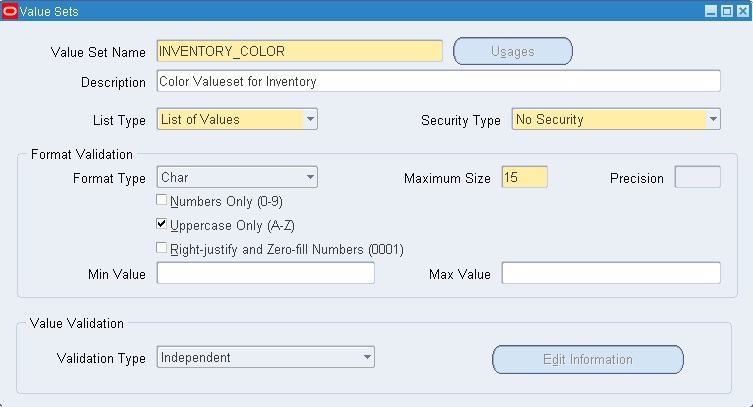
1] First we need to create a value set to hold these colors.
Navigation > Setup: Flexfields: Validation: Sets
Validation type Select: Independent
2] Next we need to enter our values in the INVENTORY_COLOR valueset
RED, GREEN, BLUE, BLACK, and ORANGE
Navigation -> Setup: Flexfields: Validation: Values
Save and close the Screen.
3] Now we need to create a KFF Structure
Navigation Setup: Flexfields: Key: Segments
Create the structure name: In the “Code” field enter INV_COLORS
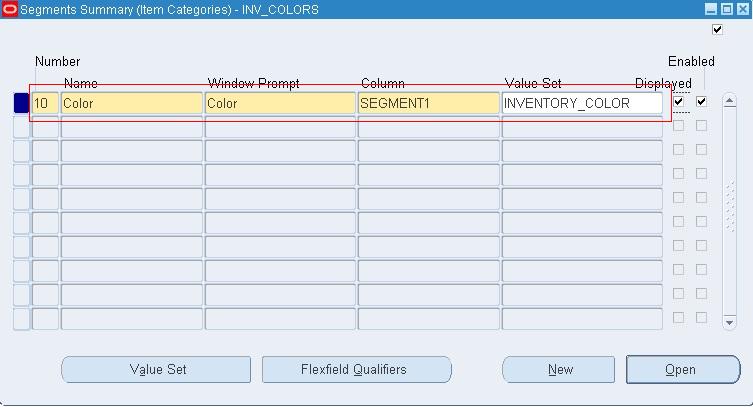
4] Click on the “Segments” button.
  • Enter the “Number” field: 10
  • Enter the Name field: Color
  • Enter the “Window Prompt”: Color (This value will appear on the screen)
  • Enter the “Column” field: Segment1 (you can choose any column)
Save and exit the form.
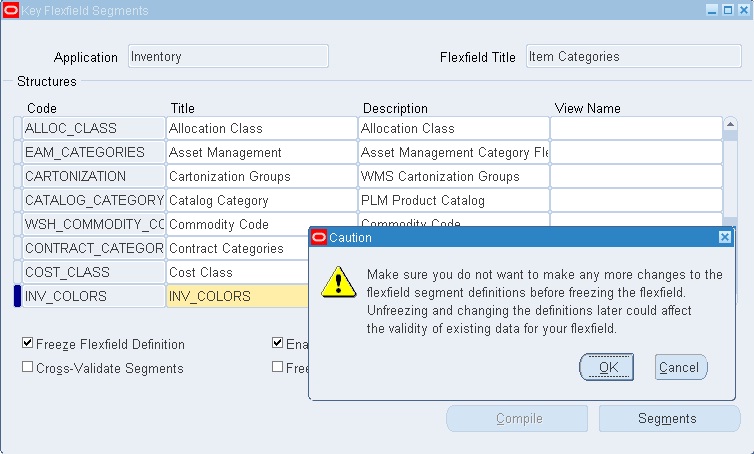
5] Check the Freeze flex field Definition, the following warning will appear.
Click OK.
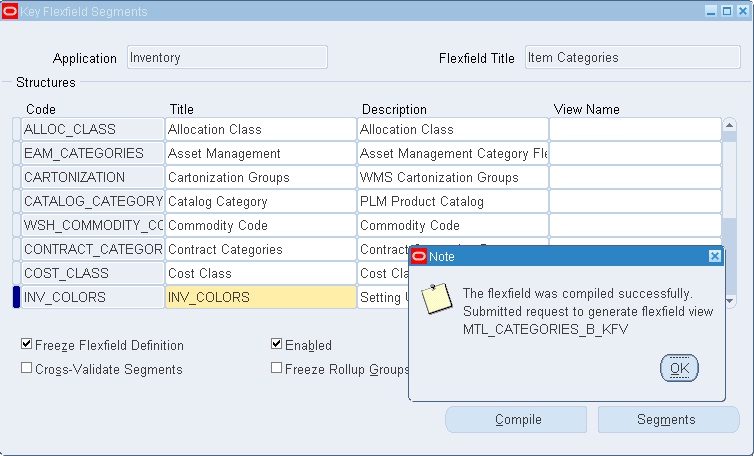
6] The “Compile” button is now available to be selected. Click on the compile button.
Click Ok
Close the form.
7] Go to View -> Request and Verify that the new Category flexfield compiled successfully.
8] The new structure is ready for use. Now let’s create a category.
Navigation : Setup: Items: Categories: Category Codes
  • Enter the structure name: INV_COLORES
  • Enter the category: BLACK
  • (Note the form does not provide an LOV for the categories. You will need to use edit symbol at the top of the page or “ e “ to bring up the lov)
  • Enter the description.
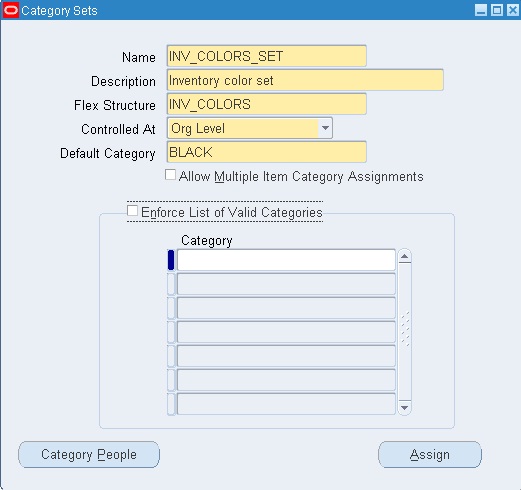
9] Next we create our category set.
Navigation Setup: Items: Categories: Category Sets
  • Fill in the category set Name: INV_COLORS_SET
  • The description: Inventory color set
  • The Flex Structure: INV_COLORS
  • The Controlled: Org Level
  • Default Category: BLACK
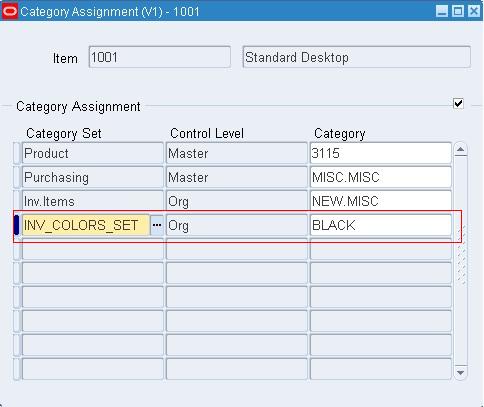
10] After creating the category set, we can assign it to any items.
There are few category APIs that will be discussed in upcoming posts. Till then GOOD BYE………!! Have a nice day